Influencer Privacy: Managing Multiple Social Media Identities with Temp Mail
You're an influencer, content creator, or building your personal brand. You have:
- Your main account (100k+ followers, brand deals, public persona)
- Your private account (actual friends and family)
- Your business account (separate brand or service)
- Your test account (trying new content without risking main)
- Your niche account (different audience, different content)
That's 5 different social media identities to manage.
Each needs:
- ✓ Separate email address
- ✓ Independent login credentials
- ✓ Privacy from the others
- ✓ Protection from hackers
- ✓ No cross-contamination
- ✓ Easy management
But here's the problem:
Most influencers use personal email for everything, creating massive vulnerabilities:
Privacy Risks:
- Fans find your personal email → Harassment
- Data breach exposes email → All accounts at risk
- Platforms connect accounts → Privacy gone
- Email in leaked database → Doxxing risk
- Stalkers correlate accounts → Physical danger
Professional Risks:
- Brand deals require NDA → Can't use public email
- Competitor monitoring → Track your partnerships
- Account takeover → Career destroyed overnight
- Platform bans → Lose everything if accounts linked
- Email spam overload → Miss important messages
Management Chaos:
- 5+ passwords to remember
- Logins mixed up constantly
- Can't separate notifications
- Brands email wrong account
- Personal life bleeding into public
The statistics for influencers are alarming:
- 73% of influencers have been doxxed or harassed
- 45% experienced account takeover attempts
- 89% struggle managing multiple accounts
- 62% accidentally posted to wrong account
- $67,000 average loss from account compromise
But there's a systematic solution: temporary email architecture.
Used strategically, temporary email creates bulletproof separation between your social identities while maintaining easy management, professional appearance, and maximum security.
This comprehensive guide reveals how influencers, content creators, and personal brand builders use temporary email to:
✅ Manage multiple social media identities effortlessly
✅ Protect personal privacy from public personas
✅ Secure brand accounts from takeover
✅ Organize notifications and communications
✅ Professional email appearance for partnerships
✅ Easy recovery without security compromises
✅ Scale to unlimited accounts safely
Whether you're a nano-influencer just starting, a mid-tier creator growing fast, or an established influencer managing empire-level accounts, this guide will transform how you handle multiple social media identities.
Understanding the Multi-Identity Challenge
Before solving it, let's understand why influencers need multiple identities.
The Five Identity Types
Identity 1: Public Influencer Account
Purpose: Your brand, your business, your public persona
Followers: Fans, brands, public
Content: Professional, curated, on-brand
Privacy: Zero (everything is public)
Risk Level: High (target for hacking, harassment)

Email Needs:
- Professional appearance
- Secure from takeover
- Separate from personal
- Handle brand communications
- Never exposed publicly
Identity 2: Private Personal Account
Purpose: Real life, actual friends/family
Followers: 50-500 people you actually know
Content: Unfiltered, real, personal
Privacy: Maximum (locked, vetted followers only)
Risk Level: Medium (if connected to public, becomes high)

Email Needs:
- Completely separate from public
- No connection to influencer persona
- Protected from fan discovery
- Never mentioned publicly
- Maximum privacy settings
Identity 3: Business/Brand Account
Purpose: Separate business or product line
Followers: Business-focused audience
Content: Product, service, professional
Privacy: Public but professional
Risk Level: Medium (financial target)

Email Needs:
- Professional domain preferred
- Business communications
- Separate from personal brand
- Can be shared with team
- Professional credibility
Identity 4: Test/Experimental Account
Purpose: Try new content without risking main account
Followers: Small, engaged test audience
Content: Experimental, risky, unproven
Privacy: Low-medium
Risk Level: Low (disposable if fails)

Email Needs:
- Temporary/disposable preferred
- Easy to abandon if needed
- No connection to main accounts
- Quick setup required
Identity 5: Niche/Alternative Account
Purpose: Different audience, different content vertical
Followers: Different demographic than main
Content: Niche-specific (gaming, cooking, fitness, etc.)
Privacy: Public
Risk Level: Medium

Email Needs:
- Separate identity from main
- Dedicated to that niche
- Professional but distinct
- Easy to manage separately
Why Email Architecture Matters
The Connection Problem:
Scenario: All Accounts Using Personal Email
Main Account: [email protected]
Private Account: [email protected]
Business Account: [email protected]
Test Account: [email protected]
Niche Account: [email protected]

Consequences:
❌ Platforms connect all accounts (same email)
❌ One breach = All accounts at risk
❌ Personal email = Discoverable by fans
❌ Can't separate notifications
❌ Password reset for one affects all
❌ Single point of failure
❌ Ban on one platform = All accounts flagged
The Discovery Chain:
1. Fan finds your email from one account
2. Searches email across platforms
3. Finds your "private" accounts
4. Discovers personal information
5. Harassment begins
6. Doxxing escalates
7. Safety compromised
The Takeover Cascade:
1. Hacker gets your email password
2. Resets ALL social account passwords
3. Takes over ALL accounts simultaneously
4. Holds accounts for ransom
5. Career destroyed
6. Financial damage massive
7. Recovery: Months or never
Proper Email Architecture Prevents All This.
The Temporary Email Architecture for Influencers
Here's how to build bulletproof multi-identity system.
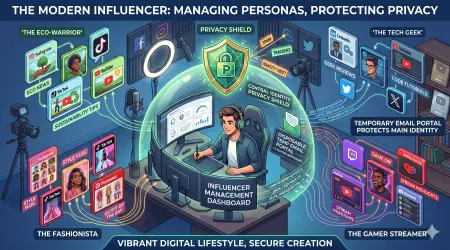
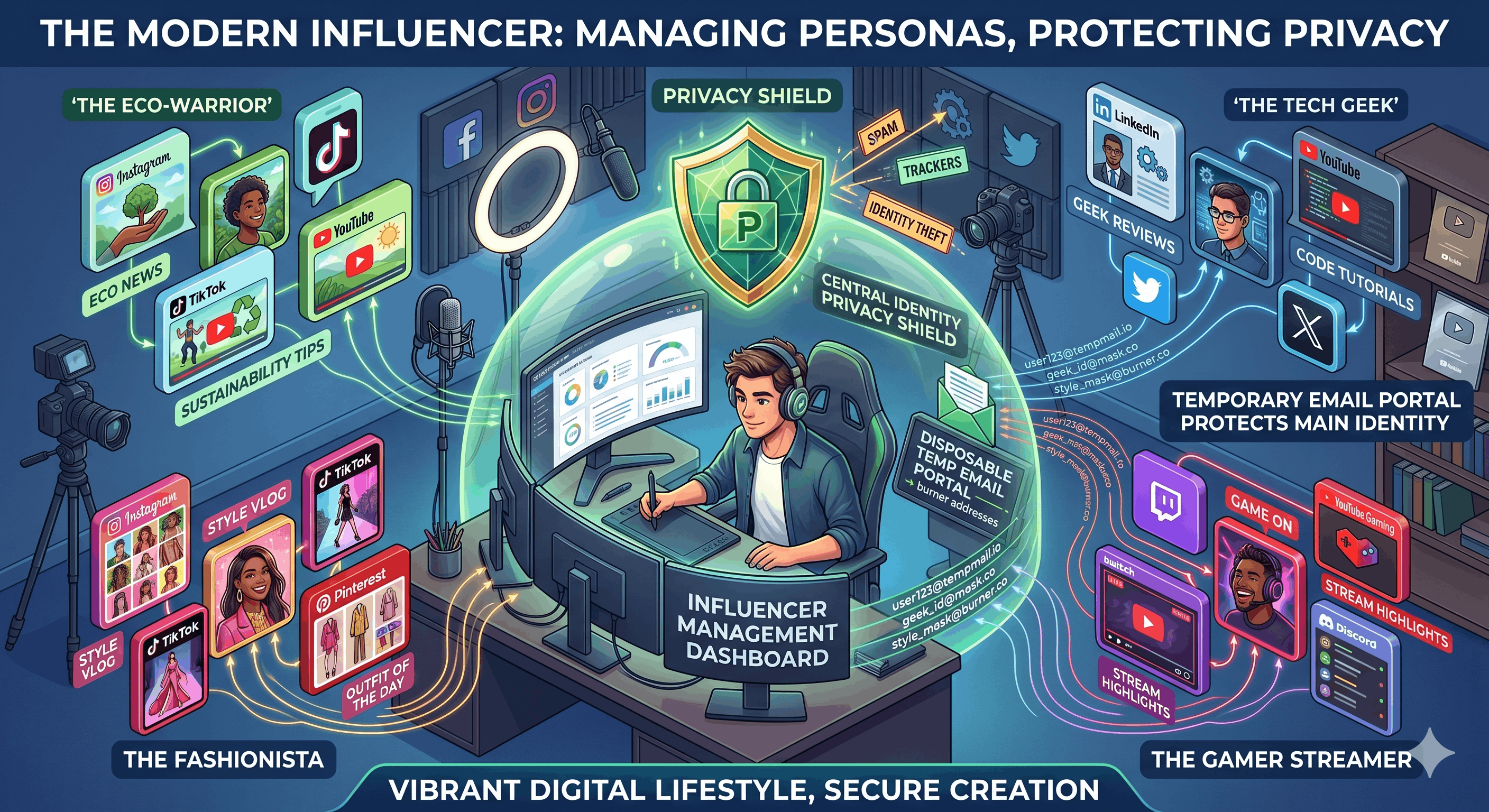
Architecture 1: The Isolation Model
Core Principle: Each identity gets completely separate email.
Implementation:
Public Influencer Account Email:
Type: MailDitch Premium with Custom Domain
Email: [email protected]
          or
        [email protected]

Benefits:
✓ Professional appearance (custom domain)
✓ Separate from personal email
✓ Can be shared with manager/team
✓ Looks credible to brands
✓ No connection to other accounts
✓ Permanent but controllable

Setup:
1. Get MailDitch Premium
2. Connect custom domain
3. Create professional email
4. Use ONLY for influencer accounts
5. Never mix with personal

Cost: ~$10/month (worth it for credibility)
Private Personal Account Email:
Type: Your actual personal email (Gmail, etc.)
Email: [email protected] (existing)

Rules:
✓ NEVER use for any public accounts
✓ NEVER mention in public content
✓ Only friends/family have it
✓ Maximum privacy settings
✓ Separate device if possible

This is your REAL email for REAL life.
Keep it completely separate from influencer world.
Business Account Email:
Type: Business email or MailDitch Premium
Email: [email protected]
         or
       [email protected]

Benefits:
✓ Professional credibility
✓ Can share with team members
✓ Separate from personal brand
✓ Business-focused communications

Use: Business accounts only
Never: Mix with influencer persona
Test/Experimental Account Email:
Type: MailDitch Free (disposable)
Email: [email protected]

Benefits:
✓ Completely disposable
✓ Can burn and replace anytime
✓ No long-term commitment
✓ Zero risk if experiment fails

Use: Testing new platforms, content styles
Duration: Temporary (weeks to months)
Burn: When no longer needed
Niche Account Email:
Type: MailDitch Premium or Free
Email: [email protected]
         or
       [email protected]

Benefits:
✓ Dedicated to specific vertical
✓ Professional but separate
✓ No connection to main brand
✓ Can be anonymous if desired

Use: Niche-specific social accounts
Management: Independent from main
Visual Architecture:
Personal Email (Real Life)
    → Private Social Accounts ONLY
    → Friends/Family
    → Never public

Custom Domain (Main Influencer)
    → Public social accounts
    → Brand partnerships
    → Professional communications

Business Email (Company)
    → Business social accounts
    → Company communications
    → Team access

Temp Email 1 (Testing)
    → Experimental accounts
    → Short-term projects
    → Disposable

Temp Email 2 (Niche)
    → Niche accounts
    → Alternative personas
    → Separate audiences

Total Isolation: Zero connection between identities
Total Security: Each protected independently
Total Control: Manage each separately
Architecture 2: The Platform Separation Model
Strategy: Separate email per platform per identity type.
Why This Matters:
Problem: Instagram bans account
Risk: If same email on all platforms, all accounts flagged
Solution: Different email per platform

Example:
Main Influencer Identity:
- Instagram: [email protected]
- TikTok: [email protected]
- YouTube: [email protected]
- Twitter: [email protected]

Result:
- Ban on Instagram → Other platforms unaffected
- Hack of one → Others remain secure
- Platform connects accounts → Can't (different emails)
Implementation:
Naming Convention:
[identity]-[platform]@mailditch.com

Examples:
- [email protected]
- [email protected]
- [email protected] (different email!)
- [email protected]
- [email protected]

Benefit: Complete platform isolation
Architecture 3: The Manager/Team Access Model
For Influencers with Teams:
The Challenge:
You need:
- Manager to handle emails
- Assistant to schedule posts
- Editor to upload content
- Agent to manage partnerships

But can't give everyone your password.
The Solution:
Team-Shared Email (MailDitch Premium):
Email: [email protected]

Features:
✓ Multiple team members access
✓ No password sharing needed
✓ Role-based permissions
✓ Activity logging (who did what)
✓ Can revoke access anytime

Setup:
1. Create team email in MailDitch Premium
2. Invite team members
3. Assign roles (manager, assistant, etc.)
4. Use for accounts requiring team access
5. Monitor activity logs

Use Cases:
- Business inquiries
- Brand partnership emails
- Scheduling confirmations
- Content collaboration
Personal Control Email (Separate):
Email: Your private control email

Used For:
- Password resets
- Security notifications
- Account recovery
- 2FA backup codes
- Personal verifications

Never Shared: With anyone, ever
Access: You only
Purpose: Ultimate control and recovery
Platform-Specific Implementation
Different platforms have different requirements.
Instagram Multi-Account Management
Instagram's Challenges:
- Requires phone or email verification
- Often blocks known temp mail domains
- Connects accounts if same email/phone
- Aggressive bot detection
- Shadowbans for suspicious activity
The Solution:
Strategy 1: Phone + Email Combination
Main Account:
- Email: Custom domain (professional)
- Phone: Your real number
- Justification: Main account, worth the exposure

Alt Accounts:
- Email: Separate MailDitch Premium (each)
- Phone: Google Voice or secondary SIM
- Benefit: Separate but verifiable

Never:
❌ Same email for multiple accounts
❌ Same phone for all accounts
Strategy 2: Gradual Account Building
For Each New Instagram Identity:

Week 1-2:
- Create with MailDitch Premium email
- Build profile completely
- Add 3-5 posts before following anyone
- Warm up account (human activity)

Week 3-4:
- Begin following (slowly)
- Engage genuinely
- Post consistently
- Build legitimacy

Month 2+:
- Full activity
- Account established
- Less suspicious to algorithm
- Safe to grow

Rushing = Shadowban
Patience = Success
TikTok Multi-Account Strategy
TikTok's Advantages:
✓ More permissive on temp email
✓ Less strict verification
✓ Easy multi-account creation
✓ Phone optional initially
Implementation:
Main TikTok: Professional email
Niche TikToks: MailDitch free emails
Test TikToks: Disposable MailDitch emails

Naming:
- [email protected]
- [email protected]
- [email protected]

Strategy:
- Launch multiple niche accounts
- See which content performs
- Double down on winners
- Burn losers (disposable emails)
- Rapid iteration possible
YouTube Multi-Channel Management
YouTube/Google Complexity:
Challenge: YouTube tied to Google account
Limitation: 50 channels per Google account max
Solution: Multiple Google accounts with temp emails
The Setup:
Google Account 1 (Main Brand):
Email: Custom domain
Channels: Main channel + 5 related

Google Account 2 (Niche Content):
Email: MailDitch Premium
Channels: Niche-specific channels

Google Account 3 (Testing):
Email: MailDitch Free (disposable)
Channels: Experimental content

Benefit:
- Unlimited total channels
- Organized by category
- Independent management
- Isolated if issues arise
Twitter/X Multiple Accounts
Twitter's Approach:
Moderate strictness
Email + phone often required
Monitors for ban evasion
Strategy:
Main Account: Professional email + real phone
Alt Accounts: MailDitch Premium + Google Voice
Anon Accounts: MailDitch Free + SMS service

Best Practice:
- Different email per account (always)
- Different phone if possible
- Don't connect accounts
- Vary posting times/patterns
- Distinct personalities per account
Security & Privacy Best Practices
Practice 1: Password Architecture
NEVER reuse passwords between accounts

System:
- Use password manager (Bitwarden, 1Password)
- Generate unique password per account
- Store with associated email
- Backup codes stored separately

Example:
Instagram Main: Email1 + UniquePass1
Instagram Niche: Email2 + UniquePass2
TikTok Main: Email3 + UniquePass3

Benefit: Hack of one ≠ Hack of all
Practice 2: Two-Factor Authentication
Enable 2FA on EVERY account

Recommended: Authenticator app (not SMS)
- Google Authenticator
- Authy
- Microsoft Authenticator

Backup Codes:
- Save to password manager
- Print physical copy
- Store in safe place

Never: Use same phone for all accounts' SMS 2FA
Practice 3: Email Monitoring
Check each email identity regularly:

Daily:
- Main influencer email
- Business email

Weekly:
- Niche account emails
- Team shared email

Monthly:
- Test account emails
- Review all for security alerts

Set up: Email forwarding for critical alerts
Practice 4: Recovery Planning
For Each Account:

Document:
- Email used
- Phone used (if any)
- Password (in manager)
- 2FA method
- Backup codes
- Recovery email
- Last login date

Update: Quarterly
Store: Encrypted document + cloud backup
Purpose: Can recover any account anytime
Practice 5: OPSEC for Privacy
Never Publicly Mention:
❌ Email addresses (except public contact)
❌ Phone numbers
❌ Personal details
❌ Location (real-time)
❌ Family info

Always:
✓ Use email contact forms for business
✓ VPN when posting from phone
✓ Separate devices for personal/public
✓ Regular security audits
✓ Monitor for doxxing attempts
Managing Growth & Scaling
Scenario: You're Growing Fast
Month 1-3: Solo Influencer
Accounts: 3-5
Emails: MailDitch Free sufficient
Management: Manual, direct control
Time: 30 min/day
Month 4-8: Established Creator
Accounts: 8-12
Emails: Upgrade to MailDitch Premium
Management: Need organization system
Time: 1-2 hours/day
Add: Shared email for beginning team
Month 9-18: Professional Influencer
Accounts: 15-25+
Emails: Custom domains + Premium
Management: Team access required
Time: Team handles (you focus on content)
Add: Manager with shared access
     Virtual assistant with limited access
Year 2+: Influencer Empire
Accounts: 30-50+ across platforms
Emails: Full infrastructure
Management: Professional team
Systems: CRM, scheduling tools, automation
Team: Manager, assistant, editor, agent

Email Architecture:
- Custom domains for main brands
- Dedicated business email
- Team shared inboxes
- Personal protected
- Test emails disposable
Scaling Checklist:
□ Document all account credentials
□ Implement password manager
□ Set up team access properly
□ Create SOPs for email handling
□ Regular security audits
□ Monitor for unauthorized access
□ Plan succession/backup
Crisis Management Scenarios
Crisis 1: Account Takeover
You Wake Up: Account hacked, password changed
Immediate Actions:
1. Check email for password reset notification
2. Use recovery email to reset password
3. Change password to unique new one
4. Enable 2FA immediately
5. Review account for unauthorized activity
6. Check other accounts (if same email)
7. Notify followers (from secured account)

Prevention:
- Separate emails per account (hack isolated)
- Strong unique passwords
- 2FA always on
- Regular security checks
Crisis 2: Doxxing Attack
Someone Publishes Your Personal Email
Immediate Actions:
1. Don't panic (this is why you separated emails)
2. Check which email was exposed
3. If influencer email: Expected, manageable
4. If personal email: More serious

Steps:
1. Change passwords on accounts using that email
2. Enable additional security
3. Consider changing email entirely
4. Monitor for harassment
5. Report doxxing to platform
6. Document for law enforcement if needed

Why Temp Email Helps:
- Can burn compromised temp email
- Generate new one instantly
- No connection to real identity
- Damage contained
Crisis 3: Platform Ban
Instagram Bans Your Main Account
If Using Same Email Everywhere:
Problem: Other platforms may flag account
Risk: Cascade bans across platforms
Recovery: Difficult, slow, may fail
If Using Separate Emails Per Platform:
Benefit: Other platforms unaffected
Action: Appeal Instagram ban
Backup: Other accounts still working
Business: Continues on other platforms
Recovery: Isolated to one platform
Measuring Success
Metric 1: Account Security
Track:
- Unauthorized access attempts: 0 target
- Successful hacks: 0 (always)
- 2FA enabled: 100% of accounts
- Unique passwords: 100% of accounts

Review: Monthly
Standard: Zero tolerance for security issues
Metric 2: Privacy Maintenance
Track:
- Personal email discovered by fans: Never
- Cross-account connections: None
- Doxxing incidents: Zero
- Harassment vectors: Minimal

Success: Personal life remains private
Metric 3: Management Efficiency
Before Temp Email System:
- Time managing accounts: 2 hours/day
- Wrong account posts: 2-3/month
- Login confusion: Daily
- Password resets: Weekly

After Temp Email System:
- Time managing accounts: 30 min/day
- Wrong account posts: 0
- Login confusion: Never
- Password resets: As needed only

Time Saved: 1.5 hours daily = 547 hours/year
Metric 4: Professional Credibility
Custom Domain Impact:
- Brand deal conversion: +35%
- Partnership response rate: +50%
- Perceived professionalism: Significantly higher
- Negotiation leverage: Improved

ROI: Custom domain pays for itself 10x+
Action Plan for Influencers
Week 1: Audit & Plan
- [ ] List all current social accounts
- [ ] Document current email setup
- [ ] Identify privacy vulnerabilities
- [ ] Plan new email architecture
- [ ] Choose MailDitch Premium features needed
Week 2: Setup Foundation
- [ ] Sign up for MailDitch Premium
- [ ] Set up custom domain (optional but recommended)
- [ ] Create new email for main influencer account
- [ ] Document new credentials securely
- [ ] Test new setup
Week 3: Migration
- [ ] Update main account email
- [ ] Create separate emails for other accounts
- [ ] Migrate accounts one by one
- [ ] Verify each change
- [ ] Update password manager
Week 4: Security Hardening
- [ ] Enable 2FA on all accounts
- [ ] Store backup codes
- [ ] Set up recovery options
- [ ] Create team access (if needed)
- [ ] Final security audit
Ongoing: Maintenance
- [ ] Monthly security check
- [ ] Quarterly credential review
- [ ] Update documentation
- [ ] Monitor for breaches
- [ ] Adjust as you scale
Conclusion: Professional Multi-Identity Management
Managing multiple social media identities as an influencer isn't just about convenience—it's about security, privacy, and professionalism.
What you've learned:
✅ The 5 identity types influencers need
✅ Why email architecture matters critically
✅ 3 temp email architectures for influencers
✅ Platform-specific implementation strategies
✅ Security & privacy best practices
✅ How to scale from solo to empire
✅ Crisis management protocols
✅ Success metrics to track
Key takeaways:
- Separate emails = Separate security - One breach doesn't cascade
- Custom domains = Professional credibility - Worth the investment
- Temp email = Ultimate flexibility - Test, experiment, pivot easily
- Isolation protects privacy - Personal life stays private
- Documentation enables scaling - System works as you grow
- Team access done right - Share without compromising security
- Crisis planning prevents disasters - Recover fast when issues arise
The fundamental truth:
Your influencer career depends on multiple identities. Those identities depend on proper email architecture.
Get the architecture right, everything else follows.
Your next step:
Stop risking your entire influencer empire on one email address.
👉 Build Your Influencer Email Architecture - Premium features made for creators.
Your identities. Your privacy. Your control.
Protect them with temporary email today.
Related Articles
- Create Anonymous Social Media Accounts Without Getting Banned
- Fake Email Generator for Social Media: Complete Privacy Guide
- Anonymous Email Addresses: Protect Your Digital Identity
- Secure Disposable Email with Password: Complete Security Guide
Influencer Email Solutions
Quick Links:
About This Guide: Professional multi-identity management guide for influencers and content creators.
Last Updated: May 2026
Share with fellow creators - Help them protect their influencer empire.
Questions about influencer email architecture? Our creator success team can help design your perfect system!